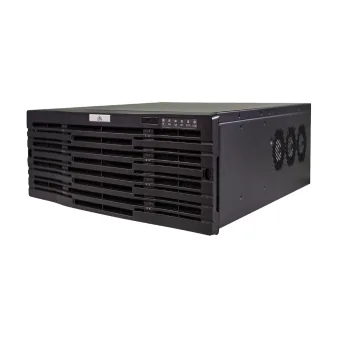
Unicorn – specificații și firmware
UNV Unicorn Center(Supports 2000-CH Input And 16 HDD SLots For Recording)
- AI persoane/vehicule
Uniview Unicorn este un echipament, listat de producător la „VMS / Unicorn”.
Pe scurt, aparatul are alimentare 100–240 V AC. Ca gabarit, cântărește 10 kg și are dimensiunile 3U, fits in 19” standard cabinet.
Pentru Unicorn, Uniview nu oferă un fișier de firmware descărcabil. Mai jos scrie cum se actualizează.
Tabelul de specificații de mai jos conține toate datele tehnice publicate de producător, traduse în română.
Cum se actualizează Unicorn
Uniview nu publică firmware pentru acest produs pe site.
Firmware-ul se încarcă din interfața web a aparatului (secțiunea de întreținere), din EZTools sau, la înregistratoare, de pe un stick USB.
Dacă producătorul publică pe viitor un fișier de firmware pentru acest model, îl adăugăm automat pe această pagină.
Specificații Unicorn
Vizualizare live
| Vizualizare live | Play live video by channel or view. 1/3/4/5/6/7/8/9/10/13/16/17/25/32/36/64 image display on single screen. Custom window layout. 3/7 window layout in corridor mode; Max. 3 auxiliary monitors; Supports view, sequence, snapshot, digital zoom, audio control, PTZ control, patrol, fisheye, 5ePTZ, panoramic linkage, multi-sensor mode, instant playback, recording, watermark, etc. |
|---|
Playback
| Redare | Play recordings saved on VMS or NVR. Playback types: normal recording, tagged recording, locked recording, smart recording playback, event recording, VCA recording. Normal recording playback supports 1/3/4/5/6/7/8/9/10/13/16 window layout. Max. 16-channel synchronous playback on a single client (depending on NVR’s stream output performance). Playback speeds: -256x, -128x, -64x, -32x, -16x, -8x, -4x, -2x, -1x, 1/4x, 1/2x, 1x, 2x, 4x, 8x, 16x, 32x, 64x, 128x, 256x (depending on NVR’s stream output performance) Supports snapshot, digital zoom, clipping, audio control, locking, tagging, rewinding/forwarding 30 seconds, zooming in/out on the timeline, playback by frame, synchronous playback, recording preview on the timeline, watermark, etc.; Download recordings by file, time, tag, lock. |
|---|
E-map
| E-map | Supports local and online (AMAP) maps; map files support jpg, png, and bmp formats. Add, delete, edit, and search maps, hot spots (video channel, alarm input, access control) and hot zones. Allows user to choose or customize hot spot icons. Live view (max 4 channels) and playback (max 16 channels) on map. Blinking alarm on map; view/clear alarms. 800MB storage space for map resources, max 7 layers of maps. |
|---|
Video wall
| Video wall | Supports multiple models of decoding devices to create video wall. Allows user to add, delete, edit, search video wall; editable information includes video wall name, size, resolution, bind/unbind decoding channels. Live view, playback, and sequence display on video wall. Save settings as a scene for quick restoration of settings when needed. Play signal source on video wall, virtual LED configuration, screen on/off control. |
|---|
Alarm configuration
| Alarm management | Alarm subscription, alarm level customization, alarm time template, email contacts management (BS client) Alarm plan configuration: add/delete/edit/search/enable/disable alarm plan; configure alarm linkage actions: live view, goto preset, alarm output, alarm to video wall (BS client also supports recording, email, buzzer, and snapshot) Alarm records search: realtime alarm records, history alarm records; history alarm records support search by alarm source, time, alarm status, alarm time, alarm level. |
|---|
Audio
| Audio bidirecțional | Two-way audio with a device. Play live video from the device. Start/stop two-way audio, adjust sound volume of MIC and speaker. Shows two-way audio status in the status bar. |
|---|---|
| Broadcast | Add, delete broadcast group members, start/stop broadcast. Choose one audio channel from the broadcast group to play stream audio. Adjust sound volume of local input and output. |
Access control management
| Manual access control | Search doors, view status, open/close doors. |
|---|---|
| Door entry/exit records | Search entry/exit records, view status, reset/export. |
| Visitor info management | Sign in/out visitors, configure permission group/blocklist. Edit visitor information, view visitor status. |
| Access control monitoring | Manage the blocklist library and use it for monitoring. |
| Blocklist alarm records | Search, view status, reset/export. |
| Attendance management | Search attendance statistics by time range, department, name, person ID; export search results. |
Detecție față
| Face library management | Add, delete, edit, and search face libraries; max. 128 face libraries. Add, delete, assign, remove, import, export faces in batches, search faces by name, ID card number, gender, etc. |
|---|---|
| Face monitoring management | Monitoring type: match alarm, not match alarm. (Alarm records can be searched in the data search module) |
| Face realtime monitoring | View live video of monitoring cameras, snapshots and comparison records. (Passing people records can be searched in the data search module). |
Checkpoint monitoring
| Vehicle library management for checkpoint | Add, delete, edit, search vehicle library information, max 16 vehicle libraries. Add, delete, assign, remove, import, and export vehicles in batches, search vehicles by plate number, plate type, vehicle color, plate color, etc. |
|---|---|
| Vehicle monitoring | Cause of monitoring: robbed vehicle, stolen vehicle, suspect vehicle, traffic violation, emergency control. (Alarm records can be searched in the data search module) |
| Checkpoint realtime monitoring | View live video of monitoring cameras. (Passing vehicle records can be searched in data search module). |
Numărare persoane
| Statistical resource management | Supports filtering areas and channels by keyword. |
|---|---|
| People counting area | Add, edit, delete people counting areas; max 8 detection areas, each area includes up to 32 channels. Configure alarms, area name, push cycle, people present alarm thresholds (critical/major/minor), and channels. |
| Crowd density detection area | Add, edit, delete crowd density monitoring areas, max 16 areas, each area allows one video channel. Configure alarms, area name, push cycle, crowd density alarm thresholds (critical/major/minor), and channels. |
| Area preview | Double-click a channel in the people counting area to view the live video in the 4-window area. |
| Realtime statistics | Displays counting results (people in/out/staying/how many more allowed) and access status on the right side and updates in real time. Crowd density (current number of people, how many more allowed), area status. |
| Reports and statistics | Count by minute/hour/day/month. Support line chart and column chart display, and display entering/leaving/staying statistics separately or in combination. Display entering/leaving/staying statistics of a certain time period or of a channel, export counting statistics. |
Mixed-traffic detection
| Mixed-traffic detection | Real-time monitoring and snapshot record display for motor vehicle/non-motor vehicle/pedestrian. Face detection records: search by channel, time, gender, age, etc. Pedestrian detection records: search by channel, time, gender, age, upper garment style/color, lower garment style/color, shoes, and backpack style. Non-motor vehicle detection records: search by channel, time, vehicle type, driving direction, speed; associated facial feature information. Motor vehicle detection records: search by channel, time, plate number, vehicle type, plate color, plate type, color logo, driving direction, speed, and vehicle color. |
|---|
Behavior search
| Device data search | Search VCA alarm snapshots and recordings by criteria including time range and alarm type (cross line detection, intrusion detection) |
|---|---|
| VMS data search | Search alarm snapshots and recordings by all/pedestrians/non-motor vehicles/motor vehicles, time range, and alarm type (cross line detection, intrusion detection, enter area, leave area). |
Data search
| Face search | Search by attribute, event, and by image: 1. Search by attribute: (1) Search conditions: channel name, snapshot time, gender, age, etc; search records support search by image. (2) View alarm image and recording, object features. (3) Data export. 2. Search by event: (1) Search conditions: monitoring type (match alarm, not match alarm), alarm source, alarm time, name, ID number, alarm source, gender, etc. (2) View alarm image and recording, object features. (3) Data export. 3. Search by image: Search people pass-through records on NVR and search for an image in a face library on VMS using a face library image (VMS) or a local uploaded face image; view alarm image and recording. |
|---|---|
| Pedestrian search | 1. Search conditions: channel name, snapshot time, gender, age, upper garment style/color, lower garment style/color, shoes, backpack style. View alarm images and object features. Data export. |
| Motor vehicle search | Search by attribute and event: 1. Search by attribute: (1) Search conditions: channel name, snapshot time, plate number, vehicle type, plate color, plate type, vehicle logo, driving direction, speed, vehicle color. (2) View alarm image and recording, object features. (3) Data export. 2. Search by event: (1) Search conditions: monitoring type (match alarm, not match alarm), alarm source, alarm time, plate number, plate color, monitoring cause, vehicle color. (2) View alarm image and recording, object features. (3) Data export. |
| Non-motor vehicle search | Search conditions: channel name, snapshot time, vehicle type, driving direction, speed. View alarm images and object features. Data export. |
Recording backup
| Automatic backup | Supports automatic backup: Add, edit, delete, view backup task schedules. Manually stop/resume backup. |
|---|---|
| Local backup | Local backup: Search, preview, back up recordings. View partitions of storage media, create folders, format. View backup task progress. |
O and M statistics
| Log search | View, acknowledge alarm logs, view operation logs |
|---|
Attendance management
| Attendance rules | Set automatic attendance calculation time. |
|---|---|
| Staff schedule | Time period setting, shifts management, staff schedule management 1. Period settings: (1) Normal period (set work hours start and end times, valid sign in and out times, attendance rules). (2) Flexible period (set calculation method, daily work duration, time to switch to the next attendance day). 2. Shifts management: Set and view shifts information. 3. Staff schedule management: assign shifts, schedule or cancel shifts. |
| Attendance handling | Leave, resign-in, and resign-in records search 1. Create, edit, delete leave information, choose leave types (causal leave, sick leave, paternity leave, maternity leave, child care leave, annual leave, family leave, funeral leave)/out for business. 2. Resign-in and resign-out. 3. Search resign-in and out records by person/time/type; edit or delete resign-in and out records. |
| Attendance statistics | Original data, attendance details, attendance summary 1. Original data: View original data of entry and exit; filter data by department/person/time/body temperature; export data. 2. Attendance details: View shifts information, sign-in and out times, attendance status, attendance duration, absence duration; filter data by department/person/time/attendance status; export data. 3. Attendance summary: View attendance result, attendance details; filter data by department/person/time; export data. |
Storage performance
| Storage performance | 16 SATA interfaces, hot-swappable HDD, max 16TB each. Supports RAID0, RAID1, RAID5, RAID6, RAID10, RAID50, RAID60 Supports 2 expansion disk enclosures, max 256TB with 32 8TB HDDs. DEU1008 disk enclosure:Up to 8 SATA HDDs, each with up to 8TB DEU1016 disk enclosure:Up to 16 SATA HDDs, each with up to 8TB |
|---|
Management performance
| Total device management capability | 1000 |
|---|---|
| Total channel management capability | 2000 |
| Cloud device management capability | 256 |
| GB/T28181 device management capability | 100 |
| Onvif device management capability | 1000 |
| Smart encoding device management capability | 100 |
| Access control device management capability | 128 |
| Decoding device management capability | 30 |
| EZAgent management capability | 20 |
| Network keyboard management capability | 50 |
| Network disk | 8 |
| Security gateway device management capability | 128 |
| User management capability | 1000 |
| Concurrent online user management capability | 300 (max 64 remote online users (connected via P2P, including but not limited to online users on mobile clients)) |
| Replica server management capability | 10 (if replica servers≥4, the primary server only engages in management). |
Stream performance
| Lățime de bandă la intrare | 512Mbps |
|---|---|
| Lățime de bandă la ieșire | 384Mbps |
| Storage stream bandwidth | 512Mbps |
| Number of recording storage streams | 256 canale (IPSAN storage+normal storage+backup storage, total 256 channels. IPSAN storage specification is 150 channels) |
Image performance
| Number of smart image storage streams | 256 canale |
|---|---|
| Image push performance | Can receive 100 vehicle or face images per second |
Alarm performance
| Alarm receiving and forwarding performance | 100 alarms per second |
|---|
Central playback performance
| Number of central playback channels | 24 canale |
|---|
Central decoding capability
| Capacitate de decodare | 3 ports, total 4-ch 4K@30, 16-ch 1080p@30, 36-ch 720p@30, 64-ch D1@30 |
|---|---|
| Decoding resolution | 12 MP/8 MP/6 MP/5 MP/4 MP/3 MP/1080P/960P/720P/960H/D1/2CIF/CIF/QCIF |
| Built-in decoding output | 2xHDMI, 1xVGA; supports simultaneous 4K output via dual HDMI ports (VGA will be unavailable in this case) |
Data storage performance
| Max storage for alarm logs | 200,000 |
|---|---|
| Max storage for operation logs | 200,000 |
| Max storage for face snapshot records | 3,000,000 |
| Max storage for face alarm records | 3,000,000 |
| Max storage for passing vehicles | 3,000,000 |
| Max storage for structured vehicle/pedestrian records | 3,000,000 |
| Max storage for access control records | 3,000,000 |
Operating temperature
| Operating environment temperature | -10ºC to 55ºC |
|---|
Operating humidity
| Operating environment humidity | 10% – 90% (noncondensing) |
|---|
Operating system
| Sistem de operare | Linux |
|---|
RAM
| Memorie RAM | 4GB |
|---|
HDD
| HDD | 16 (No HDD is included at delivery) |
|---|
Interfețe
| USB | 4*USB3.0 |
|---|---|
| VGA interface | 1 |
| HDMI interface | 2 |
| RS-485 | 1 |
| RS-232 | 1 |
| Alarmă | 24 in, 8 out |
| Storage expansion interface | 2*miniSAS |
Network interface
| Interfață de rețea | 4*GE copper interface + 2*GE optical interface |
|---|
Alimentare
| 12V DC output | 1 |
|---|---|
| Primary power input | Standard: 1 power module, optional: dual power modules, hot-pluggable |
| Alimentare | 100V – 240V AC Supports dual-power redundancy |
| Expansion power module slot (PSU1) | Standard: 1 x 300W power module, expansion: 1+1 redundancy (different from B800) |
Total power consumption
| Total power consumption | <50W (without HDD) ≤165W (with HDD) |
|---|
Physical size
| Dimensions (with front panel) (H x D x W) | 3U, fits in 19” standard cabinet 130.5mm×492mm×481.6mm (remove front panel for HDD installation) |
|---|
Weight
| Greutate | ≤ 10.0 kg (not including cards, power module, HDD) |
|---|
Client computer requirements
| Client computer requirements | 64-bit version: OS: Microsoft Windows 7/Windows 8/Windows 10, 64-bit CPU: Intel Core i5 3.1 GHz or higher RAM: 4GB or higher 32-bit version: OS: Microsoft Windows 7/Windows 8/Windows10, 32/64-bit CPU: Intel Pentium IV 3.0 GHz or higher, 4 Cores, 3.0GHz is recommended RAM: 2GB or higher Note: 64-bit operating system needs to be compatible with the 32-bit version software |
|---|
Specificațiile sunt cele publicate de Uniview, cu etichetele traduse în română (preluate la 02.11.2026). Ce nu am tradus a rămas în engleză.
Documente oficiale
- Datasheet: UNV Unicorn UNV Unicorn Datasheet.pdf (2026-09-14)
- User Manual: Unicorn_CS_User_Manual-.pdf (2024-11-01)
- User Manual: Unicorn_BS_User_Manual-.pdf (2024-11-01)
- Quick Guide: Quick Guide.pdf (2026-06-24)
- Dimensions: Unicorn_Dimensions_1.png (2026-09-15)
- Dimensions: Unicorn_Dimensions_2.PNG (2026-09-15)